Monsel Agent Orchestrator

Agents you can read, limit and stop.

The Agent Orchestrator is where you set up, run and supervise agents that do real work: raise the invoice, draft the quote, sort the inbox. You decide what each one does, what starts it, what it may use and what it may read. Work you choose waits for a person before it goes out.
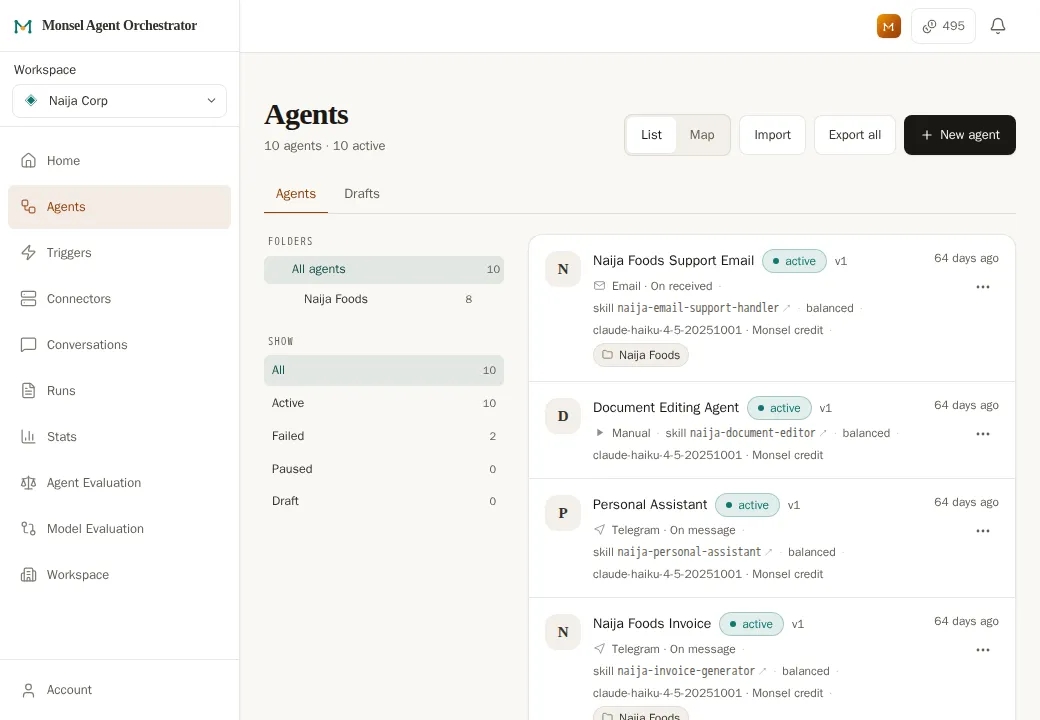
The Agents screen in Monsel Agent Orchestrator: a list of ten agents, each showing its channel, its instructions and that it is active.

The anatomy

An agent is instructions plus limits you set.

An agent is a colleague you set up for one job. Its instructions are a skill, written the way you would brief a colleague. Everything else is a setting you chose.

  1. Something starts it A message, an email, a set time
  2. It reads what you allowed Only the projects you chose
  3. It uses the tools you allowed Each one ticked on by you
  4. A person approves Where you asked for it
  5. It goes out A reply, an invoice, a report

Why it is written down like this

When an agent surprises you, its instructions, tools and run history give you what you need to find out why. The person who knows the business can change it by editing words.

What starts an agent

Something has to start it. Pick what.

One agent can have several starting points.

Chat

A chat window on your site, your WhatsApp Business number or a Telegram bot. The agent replies where the customer started.

Email

An address the agent watches. It replies in the same thread, with any files attached.

Schedule

Every weekday at eight, the first of the month, once an hour.

Your other systems

Your website or shop sends Monsel a new order, and the agent starts with the order in front of it. How website messages reach an agent

Calendar

A meeting starts or ends, so notes and follow-ups happen without anyone asking.

Another agent

One agent announces an invoice was raised. The agent that sends invoices picks it up.

Chat agents can also act when a visitor goes quiet or closes the chat.

Connections

The tools you already use, wherever they live.

Connect an account once and choose which agents may use it. The password stays with the connection, never in the instructions.

GmailOutlook and Microsoft 365Any email accountWhatsApp BusinessTelegramXWebchatGoogle DriveGoogle CalendarWordPressMessages from your website

Dropbox and OneDrive are coming.

Tools with a ready-made AI connection

Many business tools now offer one. Add it and its actions appear in the agent's list. How these connections work

Systems inside your own network

Agents can use your own database without anything being opened to the internet. More on private networks

AI on your own computer

Point an agent at a model running in your own network with Ollama, so its thinking happens on your machine. How it works

Each agent has its own list

Connecting an inbox does not let every agent send from it. You see exactly which tools each agent has.

Evaluations

Past runs are graded, and repeat faults become a fix you approve.

Instructions are written and checked in Monsel Studio. Once real work starts, the Agent Orchestrator watches how they behave. The Agent Evaluator, the Skill Health Monitor, learning from your corrections and trying a draft skill against past conversations are available on the Pro plan and above. See pricing. Agent health is on every plan.

The agent runs real conversations, real documents
Agent Evaluator grades reads past runs, names what went wrong
Skill Health Monitor checks only if it keeps happening
A small edit is proposed one step of the instructions
You approve or send it back with a reason

Nothing in this loop
changes an agent on its own.

The Agent Evaluator

Reads past runs and reports what went wrong and which instruction caused it. It never changes the agent.

The Skill Health Monitor

When the same fault keeps coming back, it drafts a small change to the instructions for you to approve.

Your corrections count too

Each time you send work back with a reason, it is kept. When several say the same thing, a change is drafted.

Agent health

One row per agent shows how often it hands conversations to a person, and flags a sharp change.

How evaluations work

Approval of work

Work you mark for approval makes the agent wait.

A reply to a customer, an invoice, a plan the next agent will act on. You see the draft, what the agent read and what it did. Then you decide.

Ask where you need it

A refund above a set amount, an unusual case, a document leaving the business.

Pass approved work on

Name the agent that carries on when you approve, and the one told when you send it back.

Send it back with a reason

The reason is required, recorded on the document and given to the agent.

This is separate from live handoff, below. See the approval step in the walkthrough

Live handoff

A conversation a person should be having.

The customer is upset, asks for a human, or wants something the agent was not built for. The agent says a colleague is coming. Whoever is on shift takes over, with the whole conversation in front of them. The customer stays where they started.

One queue for every channel

Webchat, WhatsApp and Telegram handoffs land in one place.

You are told

A chime on screen, and a phone notification when nobody is at the desk.

Hand it back

Close the conversation, or give it back to the agent to carry on.

Agents working together

Agents can hand work to each other. The default is no.

  • Permission sits on the agent being asked. It lists who may call it, and turns away anyone else.
  • An agent can also require approval, so each call waits for a person.
  • Your partners' agents can call yours with a login you create and can cancel.
  • A product you are building can call in the same way, over a live connection, and use an agent you host without building the orchestration yourself.
Front deskWhatsApp agent
Stock checkallows Front desk
Your approval calls to Invoice agent
Invoice agentrequires approval
Payroll agentallows nobody
Courier's booking agenton a partner's platform

Invoice agent is set to require approval. Front desk raises a request instead of calling it, and the call runs only if a person approves.

A map of what you built

The Agents Map shows every agent, where a person approves and who passes work to whom.

See what one agent can reach

Open an agent on the map to see what it can read and use, and any tool it used that is no longer allowed.

Runs and spend

Every run is kept, in the order it happened.

Open a run to see what started it, what it read, each action and where it stopped. A failure shows the step that failed.

  • Start an agent yourself to reproduce a problem.
  • AI usage is shown per agent and per day.
How pricing works

Co-Pilot

An assistant for using the platform.

Co-Pilot sits inside the Agent Orchestrator and knows how it fits together. You can also draft agents through Co-Pilot.

It answers from the manual

Ask how anything works and it reads the product manual first. If the manual does not cover it, it says so.

It reads your past runs

Ask why an agent handed three conversations to a person yesterday and it reads those runs.

It points to the right screen

Ask how to set something up and it takes you to the screen where you do it.

On your phone

Works as an app on your phone.

Monsel Agent Orchestrator installs from your browser. It opens in its own window with its own icon, and there is nothing to download from an app store. Open it once you have a workspace.

iPhone and iPad

In Safari, tap Share, then Add to Home Screen.

Android

In Chrome, open the menu, then choose Install app.

Computer

In Chrome or Edge, use the install icon at the right of the address bar.

Notifications can be switched on once it is installed.

Private beta

Start with the job your team repeats most.

Monsel is in private beta with a small number of businesses. Leave an email and we will tell you when the next workspaces open.

We email you when your workspace opens, and at most a handful of times before that. Every email has an unsubscribe link. Privacy.

To talk first, ask us to set agents up for your business from a written proposal, or write to hello@monsel.ai.